

You are losing 40 hours per month. At least.
Social media managers work between 40 and 50 hours per week according to recent data. Much of that time disappears into manual tasks: opening each network one by one, resizing images, copying captions, adjusting hashtags, pasting everything again.
If you manage social media for your company or clients, you recognize this routine. It is exhausting. It is inefficient. And worse: it is completely unnecessary.
The brands leading the digital market do it differently. They schedule an entire week of content in 30 minutes or less.
The good news? You can do this too. No giant team or 16-hour daily grind needed to compete on equal footing with those who dominate the market.
There is a proven way to post to multiple social networks at once, and we will show you exactly how to do it. Check out the complete guide below that will transform how you manage your social media.
Is it possible to post to multiple social networks at the same time?
Yes, it is absolutely possible to post to multiple social networks at once using a social media management tool.
The solution is simpler than most people think. Instead of logging into each platform individually, uploading the same image, rewriting the same caption, and adjusting hashtags over and over, you use a scheduling feature that automates the entire process.
Here is how it works. You write your post one time inside the tool. You upload your images or videos once. Then you select all the networks where that content should appear. Instagram, Facebook, LinkedIn, X, TikTok, and many others can all receive the same post simultaneously or at different times you choose.
The platform then publishes automatically according to your settings. Want everything to go live on Tuesday at 9 AM across five networks? Set it and forget it. Prefer to send the same post to Instagram at 8 AM, LinkedIn at 12 PM, and X at 6 PM? That is also possible. You stay in full control while the tool handles the execution.
Data from a 2026 report analyzing over 12,000 users shows that the average brand manages 4.5 social media accounts simultaneously.
More than half of these users handle three or more accounts, and 17% manage seven or more profiles at the same time. Without a centralized tool, this level of multi-account management quickly becomes unmanageable.
Research also reveals that manual social media management consumes between 60% and 70% of a social media manager´s weekly working hours. Tasks like logging into each network separately, copying captions, resizing images, and pasting hashtags repeatedly add up to hours of lost productivity every day.
These cross-platform post schedulers centralize all your work in one dashboard. No more jumping between tabs. No more copying and pasting.
No more wondering whether you forgot to post on a particular channel. Everything lives in the same place, and the time you save adds up to hours every single week.
Key challenges of posting to multiple social networks
Using a tool to post to multiple social networks at once helps tremendously, but it does not solve everything.
Even with automation, posting to multiple social networks involves challenges that go beyond scheduling. See the main ones below.
Posting identical content
Many people believe that content is content. They think an image or video that works on Instagram will also work on LinkedIn, TikTok, Facebook, and other networks.
But this belief is a mistake. Instagram, TikTok, LinkedIn, and X use different image and video dimensions, character limits, and visual priorities.
Research shared by Rafael Kiso, CMO and founder of mLabs, shows that 49% of social media professionals are adapting the same content for different social network formats [1].
The tip is to repurpose the same content while always making specific adaptations for each platform. Important parts of the message may be cut off, poorly displayed, or simply not perform as well as they should.
Maintaining consistent frequency across all networks
In the beginning, the feeling is that publishing on multiple networks at once will accelerate results. Over time, it becomes clear that maintaining frequency across all channels requires much more planning than it seems.
Social media algorithms respond better to profiles that post regularly, but this regularity does not work the same way on every network.
The most common mistake is reusing the same calendar for all networks without adaptation, which leads to abandonment of some channels and burnout on others.
Publishing at the best times for each platform
Networks like Instagram, TikTok, LinkedIn, and X have very different usage peaks, and this directly impacts organic reach.
For example, studies show that many Brazilian users access Instagram between 8 PM and midnight. But that does not mean this is the best time for you, because that is also when most profiles post and compete for attention.
When you simply reuse the same time slot across all networks without considering your audience´s actual behavior on each platform, you lose reach because your content joins the congestion of other posts at that moment.
Rafael Kiso, CMO of mLabs and our founder, uses the metaphor that posting during peak hours can be like entering a traffic jam. Your content gets stuck in the middle and does not stand out.
Remember: social media algorithms quickly observe how your audience reacts in the first minutes after publication. If the post was repurposed without adaptation and published at a time when your specific audience is less active, that initial engagement may be low, and the algorithm stops distributing that post.
How to adapt the same content for different social networks?
Check out how the top brands in the digital market are reusing their content across social networks.
1. Resize images and videos according to each network’s format
Platforms use different screen proportions and sizes for images and videos. This directly influences how your content is displayed.
Reusing the same file without adjustment can cause important parts of the image to be cut off or lose prominence.
The strategy here is to export different versions of the same creative asset, each optimized for the ideal size of the network where it will be published.
2. Break long content into specific pieces for each channel
Not all long content works well at once on short-form networks. If you have a long video or article, break it into smaller parts that make sense on other platforms.
A 2-hour podcast on YouTube can become short clips for TikTok and Reels. The main points of that content can also become an Instagram carousel or an X thread.
This strategy of fragmenting main content into smaller, specific formats helps keep the message consistent while respecting what each network prefers to showcase.
3. Customize calls to action (CTAs) per platform
A simple call to action like “click the link in bio” works on Instagram, but on LinkedIn you can place the direct link in the post.
On X, a short CTA with an emoji may have more impact, while on TikTok you can encourage comments or duets.
Adapting the call to action to what makes sense for that specific network feature increases the chance of audience reaction.
This customization shows that the post was not simply copied, but adjusted to the way that particular network generates engagement.
4. Repurpose high-performing formats without starting from scratch
Stop guessing what works. Go straight to your analytics and find the posts that already exploded. Did a Reel get 50,000 views? Great. Export it and drop it on TikTok with just minor tweaks to the overlay text.
Did a LinkedIn carousel generate hundreds of comments and shares? Even better. Turn each slide into an X thread or stitch them together as an Instagram carousel series.
You do not need to reinvent the wheel every single time. That is a waste of energy and creativity. The winning format already exists inside your own content library. Identify it, pull it out, brush it off, and let it run on multiple stages.
The audience on TikTok has never seen your LinkedIn masterpiece. The people scrolling Instagram missed that X thread completely.
Give them the same value but served in the way their platform likes to eat it. Same core content. Different plate. New audience. Double the return.
5. Adjust tone and formality like switching outfits for different events
You would never wear a tuxedo to the beach. You would not show up to a board meeting in flip-flops. The same logic applies to your content voice.
LinkedIn demands professional, data-driven language. Think charts, case studies, complete sentences, and a respectful tone. Your audience there expects authority and evidence.
TikTok wants authenticity, speed, and personality. Short sentences. Quick cuts. Real unpolished moments. Imperfection actually works in your favor.
Instagram lives in the middle ground. Beautiful visuals, conversational captions, and a friendly but still polished tone. It is the coffee shop of social networks. Relaxed but put together.
Your core message about your product or service stays exactly the same across all of them. But the way you deliver it changes completely depending on the room you are walking into. Write the formal version for LinkedIn with statistics and professional phrasing.
Write the punchy, emoji-friendly, fast version for X. Write the warm, relatable, story-driven version for Instagram. Same message. Different voice. Maximum impact.
Your audience will notice the effort. They will trust you more because you respected their space. And they will engage because you spoke their language.
How to post to multiple social networks at once in practice?
Check out what you need to know to post to multiple social networks at once. With a social media management tool, this process becomes simple and scalable.
Connect your social media profiles
Management platforms work by connecting your social media accounts. Instagram, Facebook, LinkedIn, X, or TikTok become managed from a single dashboard.
This centralization is what eliminates the need to manually log into each social network to post content.
Access the scheduling functionality
With profiles already connected, the next step happens inside the content creation area.
The post scheduling feature allows you to write the text, upload images or videos, and choose which networks will receive the content.
Set publication dates and times
Platforms allow you to choose specific dates and times for each post. You can set the same time for all networks or adjust according to each one´s behavior.
This control ensures content is published automatically, even when you are not online.
Organize your planning in the calendar
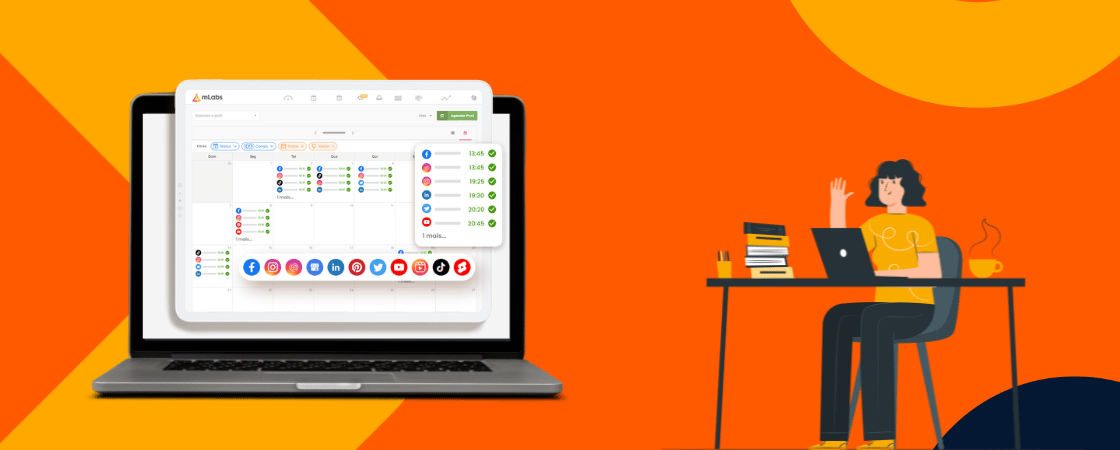
Once posts are scheduled, everything becomes visible in a calendar. This platform feature shows what will be published each day and on each social network.
The main purpose of the calendar is to make it easier to plan the next days or weeks of content. It also helps identify gaps and avoid periods without posting.
How does mLabs make publishing to multiple social networks easier?
mLabs is a social media management tool used by thousands of brands to centralize, plan, and automate publishing and analytics across different digital channels.
The platform connects Instagram, Facebook, LinkedIn, TikTok, X (Twitter), YouTube, Pinterest, and Google Business Profile in one place, eliminating the need to log into each network separately.
Here is how mLabs helps you post to multiple social networks at once.
Schedule posts without the manual grind
Stop opening five tabs and copying the same caption over and over.
With mLabs, you create your content a single time, choose exactly which networks will receive it, and set the dates and times for each one.
The platform takes care of the rest. Want the same post to go out on Instagram at 8 AM and LinkedIn at 10 AM? No problem. Need different captions for each network? Also possible. You stay in control while the automation does the heavy lifting.

Generate captions with AI assistance
Writer´s block is real, especially when you need to adapt the same message for four different platforms. mLabs includes AI-powered caption generation that helps you create platform-appropriate text in seconds.
Describe what you want to say, and the tool suggests variations tailored to Instagram, LinkedIn, TikTok, or X.

Adjust tone, shorten for character limits, or expand for professional audiences. The AI accelerates the adaptation process without stripping away your brand voice.
See everything in a visual content calendar
Scheduling posts is one thing. Seeing the full picture is another. mLabs offers a visual calendar that displays every scheduled post across all connected profiles.
Which days are packed? Which networks have gaps? When is your next LinkedIn post going live? The calendar answers all these questions at a glance.

Drag and drop to reschedule, spot empty periods before they happen, and plan entire weeks in under ten minutes.
Track performance with automated reports and dashboards
Publishing is only half the battle. You also need to know what works. mLabs includes automated reports and dashboards that pull performance data from every connected network.

See which posts drove engagement, which formats performed best, and which hours delivered the highest reach. Use those insights to refine your scheduling strategy.
No more manual spreadsheets or logging into each platform just to check analytics. Everything lives in one dashboard.
Liked the tips on how to post to multiple social networks at once?
You can start your free trial on mLabs right now. No credit card required upfront. Test 100% of the platform’s features.